Data Anonymizer: How to Anonymize Sensitive Data in Excel
About to share an Excel file with a freelancer or agency but it contains real names and emails? Data Anonymizer replaces sensitive data with realistic fake values — GDPR-ready in one click.

Essential Settings for Data Anonymizer
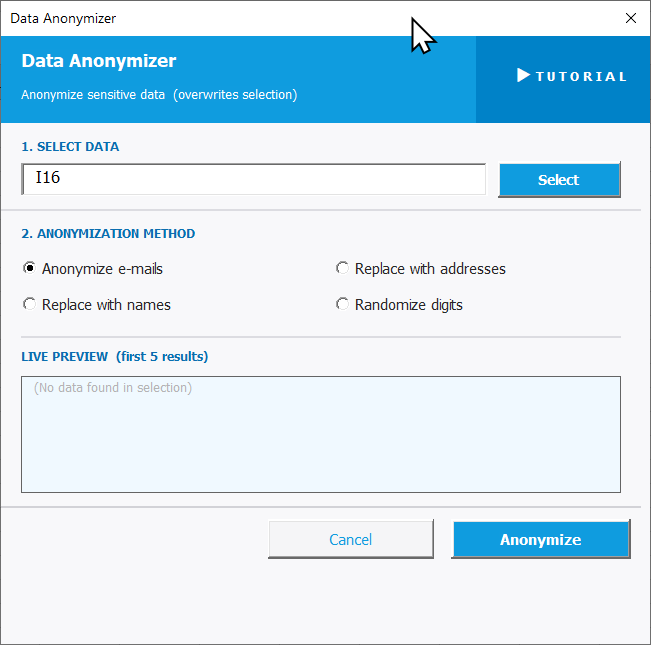
To open Data Anonymizer, go to the XLclick tab, find the Fix and Clean group, then click Refine > Data Anonymizer.
The tool overwrites your selection directly, so duplicate the sheet first if you need to keep the original.
The panel walks you through two steps:
1. SELECT DATA — Click Select and highlight the column or range containing the sensitive data you want to anonymize.
2. ANONYMIZATION METHOD — Choose the type of replacement that matches your data:
- Anonymize e-mails — replaces real email addresses with random but realistic-looking fake ones.
- Replace with names — replaces values with randomly generated full names.
- Replace with addresses — replaces values with fake street addresses.
- Randomize digits — scrambles numeric characters while keeping the same format and length.
The LIVE PREVIEW shows the first 5 anonymized results before you apply. Click Anonymize to run, or Cancel to exit.
Real-World Scenarios: Top Use Cases for Excel Data Anonymizer
A Marketing Agency Preparing Client Data to Share With a Freelance Designer
A marketing agency needed to hand off a customer email campaign file to a freelance designer for template testing. The file contained real subscriber names and email addresses. Sharing it as-is would have violated GDPR and the client's data agreement.
Data Anonymizer with Anonymize e-mails and Replace with names replaced all real data with convincing fake values in seconds. The designer got a realistic file to work with, and no real data left the company.
A Freelance Consultant Anonymizing a Client Database Before a Demo
A freelance business consultant used a client's real customer database to build a demo dashboard for a prospect presentation. Before the meeting, he realized the file still had real company names and contact details — completely inappropriate to show.
Running Data Anonymizer with Replace with names on the contact column replaced every real name with a plausible fake in one click. The dashboard looked authentic, and no confidential data was exposed.
A Small Business Owner Sharing Payroll Data With an External Accountant
A small business owner needed to send her payroll spreadsheet to an external accountant for tax preparation. The file included employee names, addresses, and salary figures. She was unsure how much to share, and GDPR compliance was a concern.
She used Data Anonymizer with Replace with names and Replace with addresses on the personal columns, keeping only the salary figures real. The accountant received exactly what was needed — nothing more.
An HR Team Testing a New Import System With Realistic Employee Data
An HR team needed to test a new HRIS import system but didn't want to load real employee records into a staging environment. Creating fake test data manually for 200 rows was tedious and time-consuming.
Data Anonymizer with Replace with names and Randomize digits on the ID columns converted the real employee sheet into a fully anonymized test file. The import tests ran on realistic data with zero privacy risk.
A SaaS Company Preparing Support Ticket Data for an External QA Agency
A SaaS company wanted to share a sample of real support tickets with an external QA agency to improve their response templates. Each ticket contained real customer names and email addresses — data that could not leave the company under their privacy policy.
Data Anonymizer replaced all names and emails with realistic fake values before the file was exported. The QA agency got authentic-looking ticket data to analyze, with full compliance maintained.

Excel has always been my laboratory. After years of navigating data-heavy workflows, I created XLclick: the definitive add-in that simplifies complex analysis into a single click. It’s built for pros who want to spend less time on spreadsheets and more time on strategy.